A promise, not a prediction.
The brief asked me to predict an AI agent’s cost; I gave people a ceiling they approve before it starts.
Problem
The meter only runs after you agree.
On Runable a question costs a few credits and a website thousands, but you see the cost only after work starts, so people get surprised or stop trying big tasks.
What I found
My first version was built on guesses.
My first prototype came from old blog screenshots. The live app already had Plan mode, a Usage panel with no ceiling, and a model menu swinging cost from 1× to 90.8×.
What it cost
Matching the live app meant throwing away a finished first build, late in the process.
Proof
Three changes to things Runable already ships, not a new feature to learn.
The notes behind this
- The model menu doesn’t say what Auto picked.
What I decided
Every estimate breaks when the agent takes a turn.
I mapped the directions with AI; every one that only predicted broke when an agent retried a failed payment step twice, so I stopped predicting and started promising.
What I decided
One number, and it’s the ceiling.
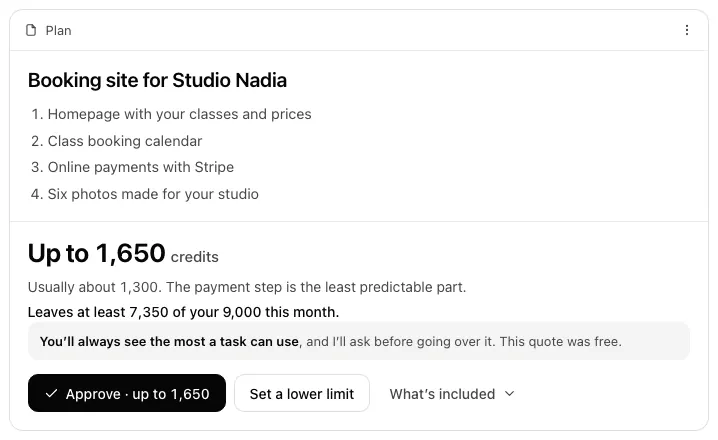
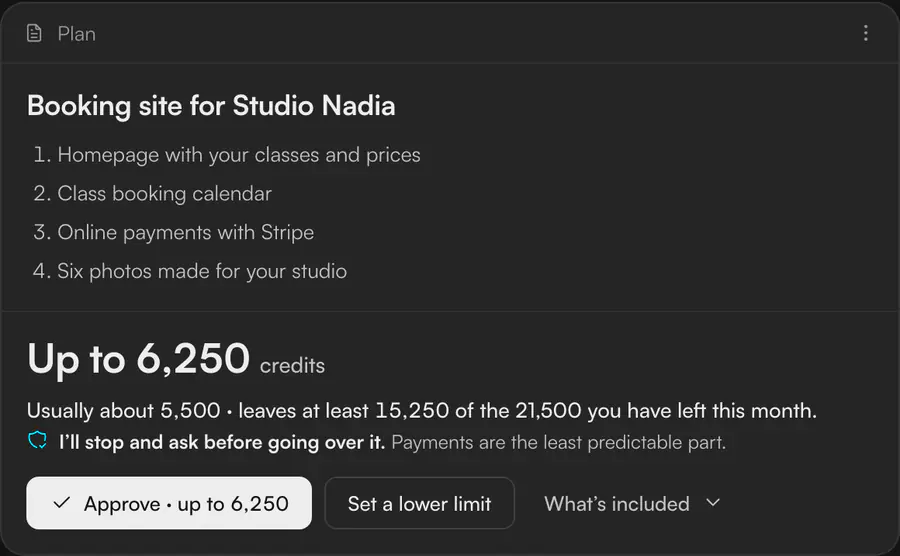
After Send, Runable asks only the questions that change the cost. The maximum is the only number it can guarantee, so it leads.
What it cost
A maximum can look scarier than an average, but the average is the number that breaks.
Proof
A review caught lines adding up past the headline; every sum now matches.
The notes behind this
- No number while typing: an estimate is least accurate there.
- A quiet “usually about 5,500” sits beside the maximum.
What I decided
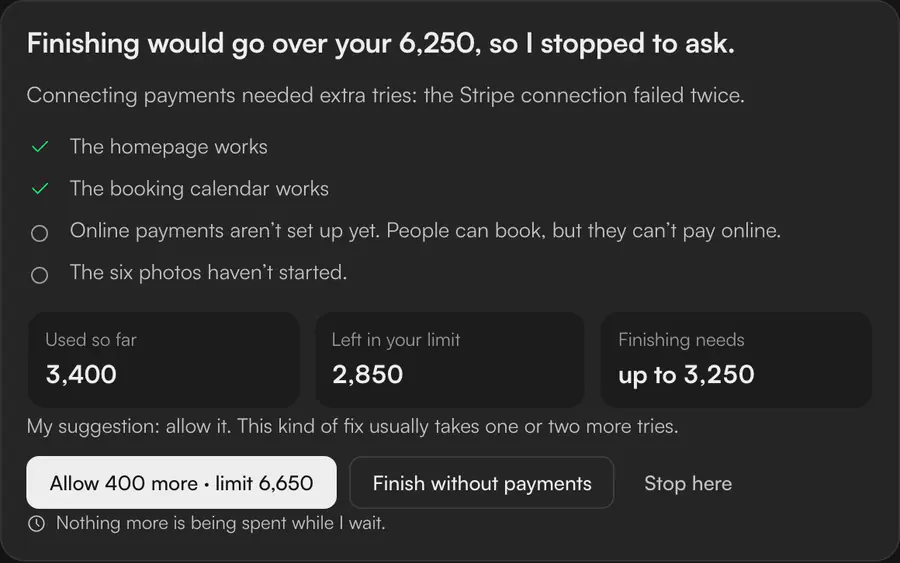
Stop before the line, and ask only for the difference.
Payments fail twice, so finishing would cross the limit. The agent waits for in-flight work to settle and asks for exactly 400 more.
What it cost
A pause interrupts, and my hypothesis is that people learn to click Allow unread.
Proof
In a simulated read-through (no real people), the reader took 2,050 for the increase; “Allow 400 more” on the button fixed it.
The notes behind this
- In my model, with retry rates I chose myself, about one run in nine paused: a model output, not a measurement.
- The read-through stood in for a five-second test.
What I built
A clickable prototype on Runable’s own screens.
A take-home concept, so nothing shipped; the prototype runs the ceiling and pause in six more situations, stress-tested with 60,000 simulated runs, not yet with people.
The free plan finishes today and defers the rest
See five more situations
A running total for the whole site
No honest estimate, so it asks for a limit
Quick tasks just start
A repeated task earns its own number
Slack, iMessage and always-on agents
Looking back
Next time, I’d show one flow.
Runable said no: good work, but they felt I leaned on AI too much, and on this brief they had a point. Seven scenarios, a 36-slide deck and a narrated video for a one-day brief hid the thinking.
Beyond the brief
The reframe, the cuts and the rebuild on the real app were my decisions, and the idea holds up. AI made it easy to add; the job was to subtract. I’d also write my reasoning before any AI draft, and put three people in front of the quote: one real person misreading the ceiling as a price would teach me more than any simulation.